Top 5 Hikvision Face Recognition Door Access Systems Singapore (2026)
In the post-pandemic landscape of Singapore, the shift from contact-heavy fingerprint scanners to contactless facial recognition is no longer a luxury—it’s a standard for hygiene and operational efficiency. However, with dozens of models available, choosing the right terminal for your specific office or warehouse layout is critical.
At Assista, we have analyzed the technical architecture of the latest Hikvision MinMoe series. Here are our top 5 picks for 2026, ranked by use case and technical specifications.
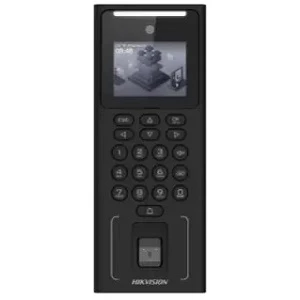
1. The Compact All-Rounder: DS-K1T321MFWX
Best For: Small retail shops, boutique offices, or back-room access.
- Capacity: 500 Faces / 3,000 Fingerprints / 3,000 Cards.
- Key Feature: 2.4-inch LCD screen with Wi-Fi support.
- The Technical Edge: While it has a smaller screen, it uses the same Deep Learning algorithm as the high-end models.
- Why choose this? If you have a small team (<100 pax), you don’t need to overpay for capacity. This model provides the high-speed recognition (<0.2s) of the Pro series at a fraction of the cost.
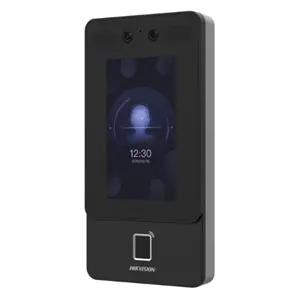
2. The SME Gold Standard: DS-K1T342MFWX-E1
Best For: Standard Singapore SME offices (20–100 employees).
- Capacity: 1,500 Faces / 3,000 Fingerprints / 3,000 Cards.
- Key Feature: 4.3-inch Touch Screen + Standard PoE Support.
- The Technical Edge: This model supports Power over Ethernet (PoE), allowing the terminal and the door lock to be powered via a single LAN cable.
- Why choose this? It simplifies installation in offices with false ceilings (like those in Northpoint Bizhub or Ubi), reducing cabling costs significantly. For a complete structural blueprint on deployment, read our step-by-step framework to planning and deploying a face recognition door access system in your workspace seamlessly.
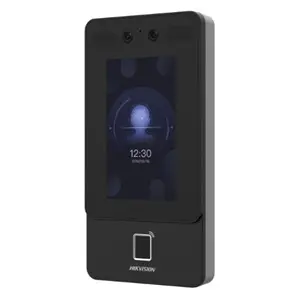
3. The Wired Powerhouse: DS-K1T342MFX-E1
Best For: High-security areas where Wi-Fi is restricted (Server rooms, Financial depts).
- Capacity: 1,500 Faces / 3,000 Fingerprints / 3,000 Cards.
- Key Feature: No Wi-Fi (Hardwired Ethernet Only).
- The Technical Edge: By removing the Wi-Fi module, you eliminate a potential wireless “attack surface.”
- Why choose this? For businesses following strict Cybersecurity Labelling Scheme (CLS) guidelines in Singapore, a hardwired connection is often preferred for stability and security.
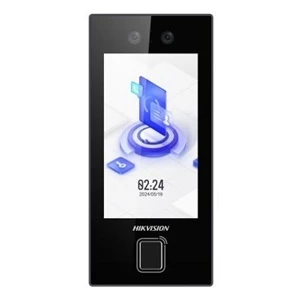
4. The Modern Connectivity King: DS-K1T344MBFWX-E1
Best For: Large-scale offices or co-working spaces with high traffic.
- Capacity: 3,000 Faces / 3,000 Fingerprints / 3,000 Cards.
- Key Feature: 4.5-inch Screen + Bluetooth + Wi-Fi.
- The Technical Edge: The “B” in the model stands for Bluetooth, allowing for future-proof integrations with mobile phone credentials.
- Why choose this? Its 4.5-inch screen is larger and more intuitive for visitors. It’s the “Flagship” of the Value series, offering the best balance of speed and user experience for premium office entrances.
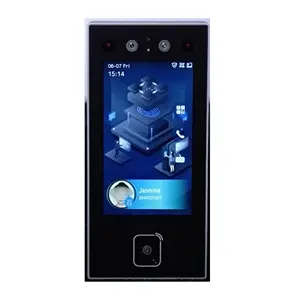
5. The Industrial Workhorse: DS-K1T344MFX-E1
Best For: Warehouses and production floors (Tuas, Jurong Industrial Estate).
- Capacity: 3,000 Faces / 3,000 Fingerprints.
- Key Feature: IP65 Rated + Large Screen.
- The Technical Edge: Designed for durability, the 344 series features a more robust housing compared to the entry-level 321.
- Why choose this? In environments where workers might have dusty or oily hands (preventing fingerprint use), the large 4.5-inch screen and 1.5-meter recognition distance make entry seamless even in industrial settings.
Which Door Access Control System is Right for Your Business?
Systematic Expert Advice for Singapore Buyers
When selecting your Hikvision model, don’t just look at the face capacity. Consider these three “Assista Factors”:
- Mounting Height: For Face Recognition to work optimally, the camera should be at eye level (approx. 1.4m to 1.5m).
- Backlight Conditions: If your office glass door faces the afternoon sun, ensure you choose models with WDR (Wide Dynamic Range) to prevent “silhouetting.”
- PDPA Compliance: Ensure your installer (like Assista) configures the system to store “Facial Templates” (mathematical hashes) rather than actual photos to stay compliant with Singapore’s data privacy laws.
Is your office ready to upgrade? Explore our Full Guide to Face Recognition Door Access Control Systems or contact Assista for a discussion.
